Write your steps into Excel (or just record them once) and let the computer do the rest — image recognition / window management / OCR / browser automation / workflow orchestration / NetLink multi-device / scheduled tasks / local AI enhancement, all built in.
Latest: (pre-release) · · 13.4 MiB · SHA-256 473f1db3…06d54
Workflow diagram
No programming required. Find your role below — every scenario is backed by built-in templates, sample scripts or dedicated commands.
From "record it once" to "fully automated" — in as little as 3 minutes.
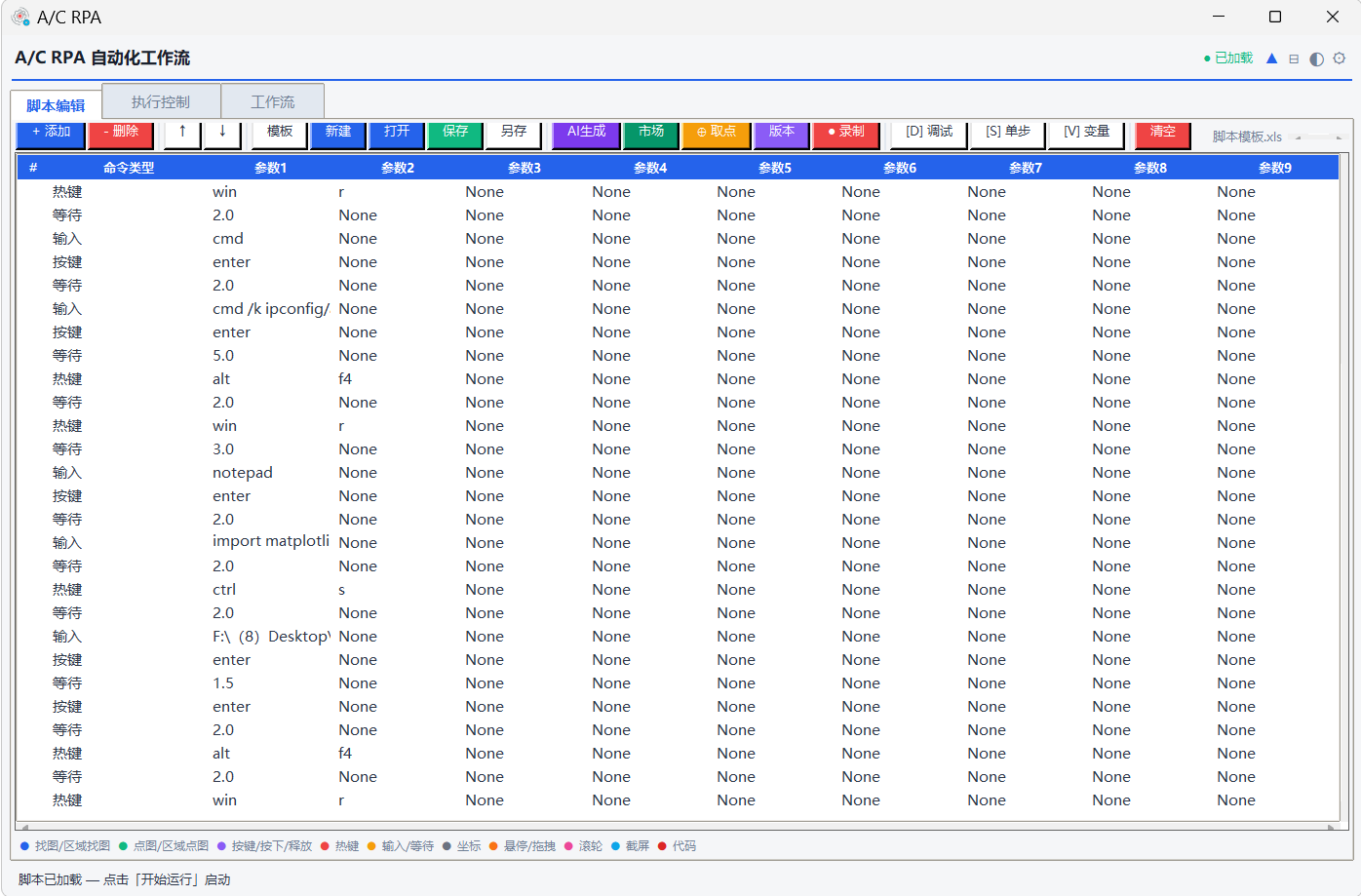
Use the built-in recorder to run through the steps once and generate a script automatically; or write one command per row directly in a .xls sheet — 51 built-in commands, if you can fill a spreadsheet you can write a script.
Just adjust the window title and parameters; if fixed coordinates are unstable, switch to "AI Find Image" and describe the element in plain language, or use OCR "Click Text" to locate by text — small UI changes stay adaptive.
Run immediately, debug with breakpoints, or hand it to the scheduler; you can also distribute scripts in bulk over NetLink to many machines on the LAN.
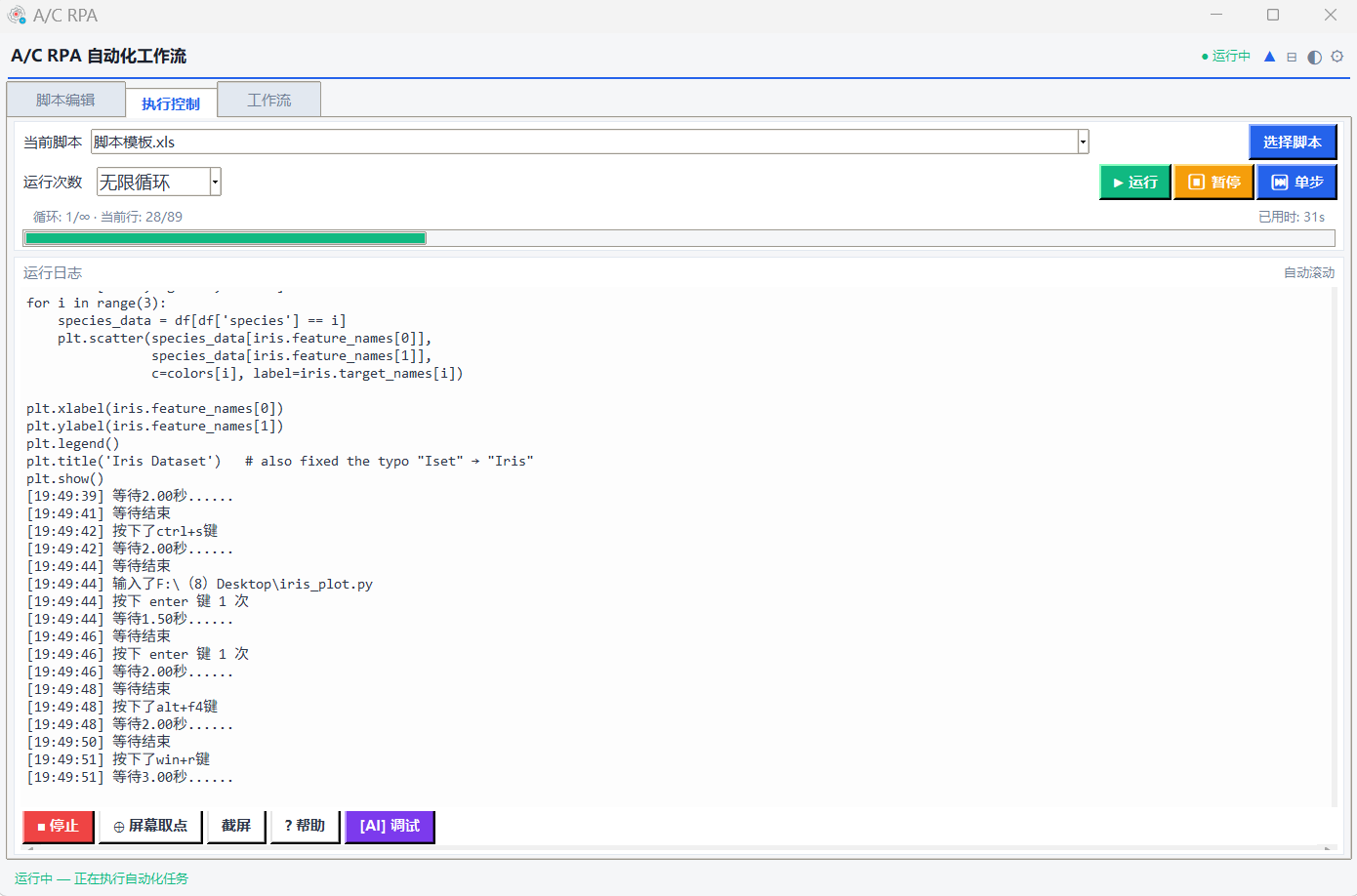
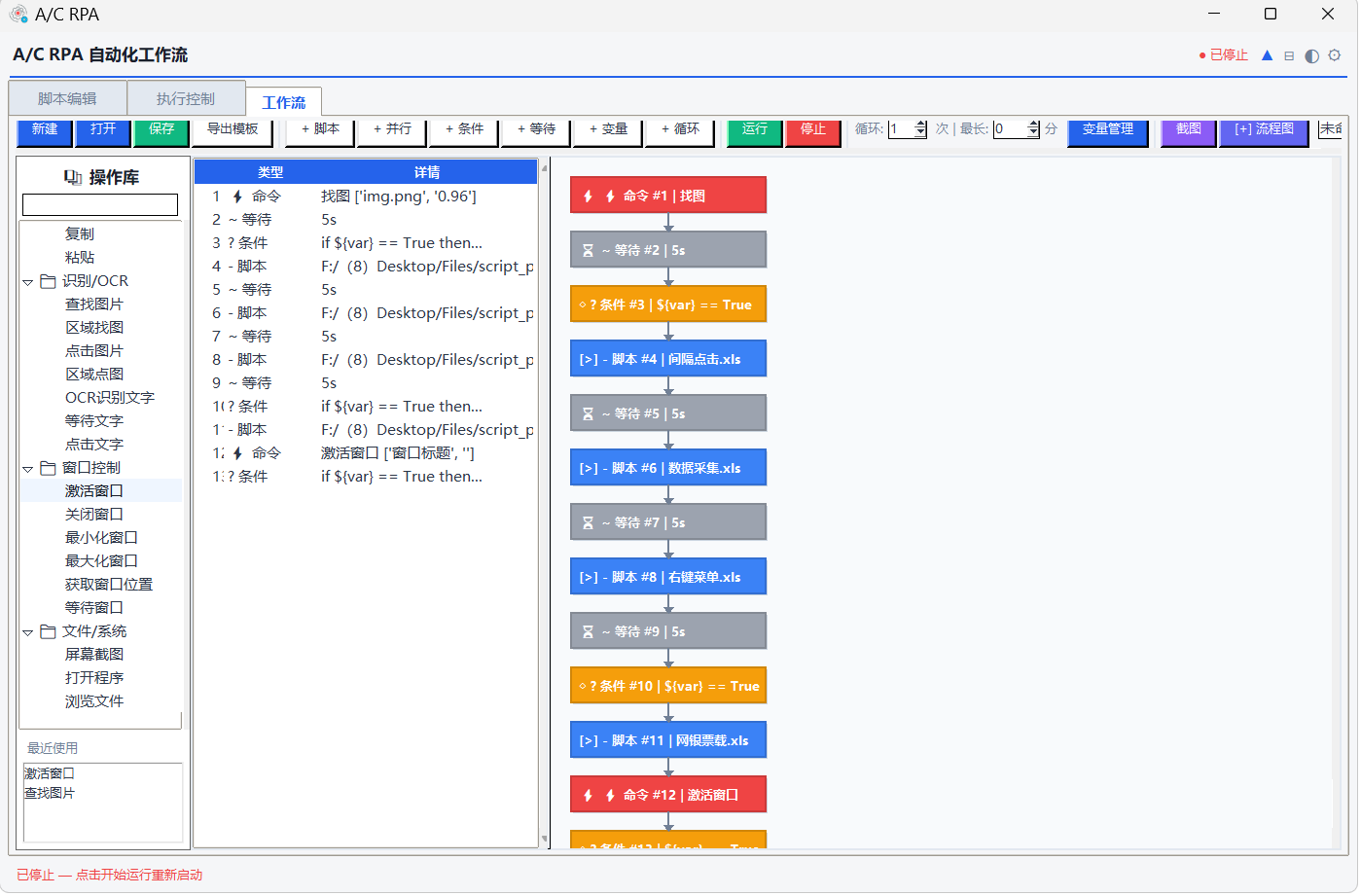
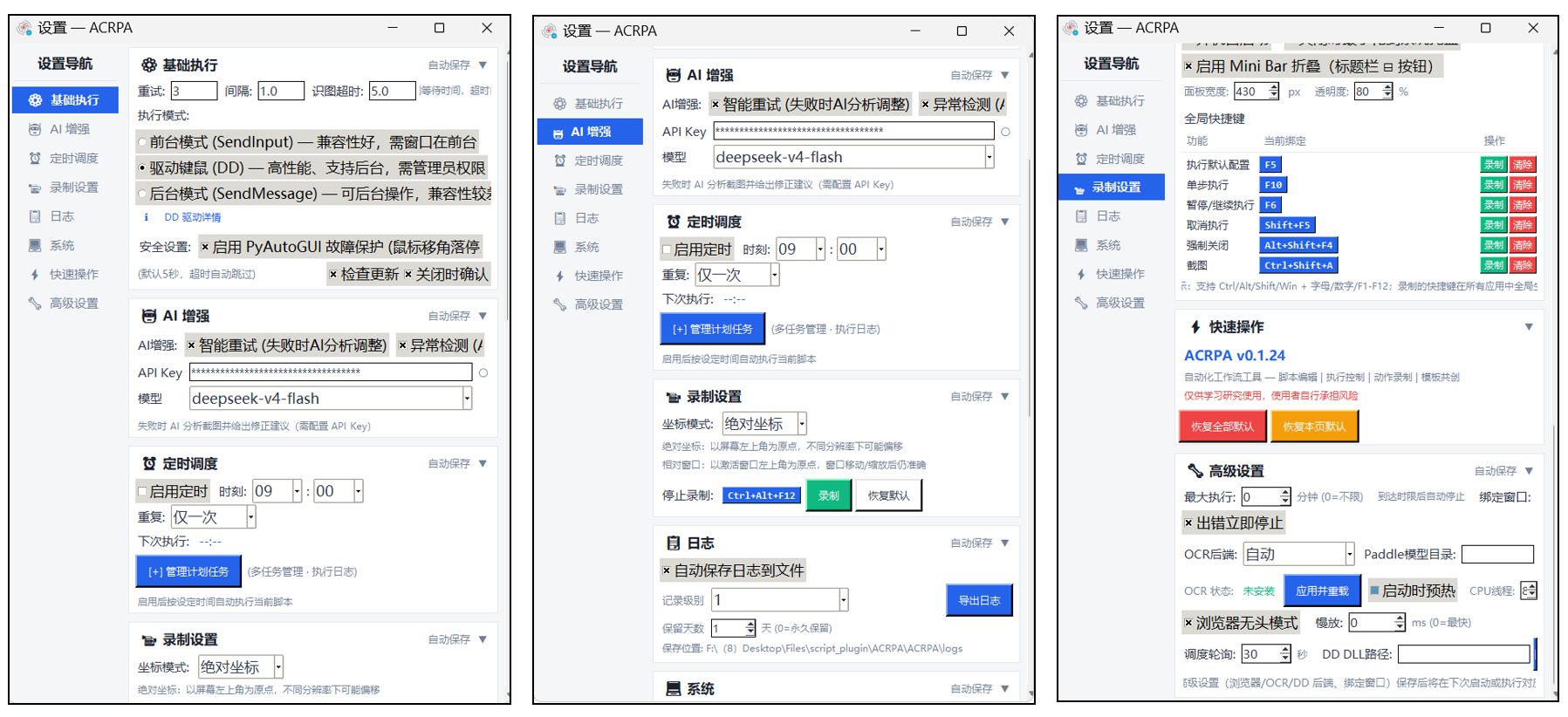
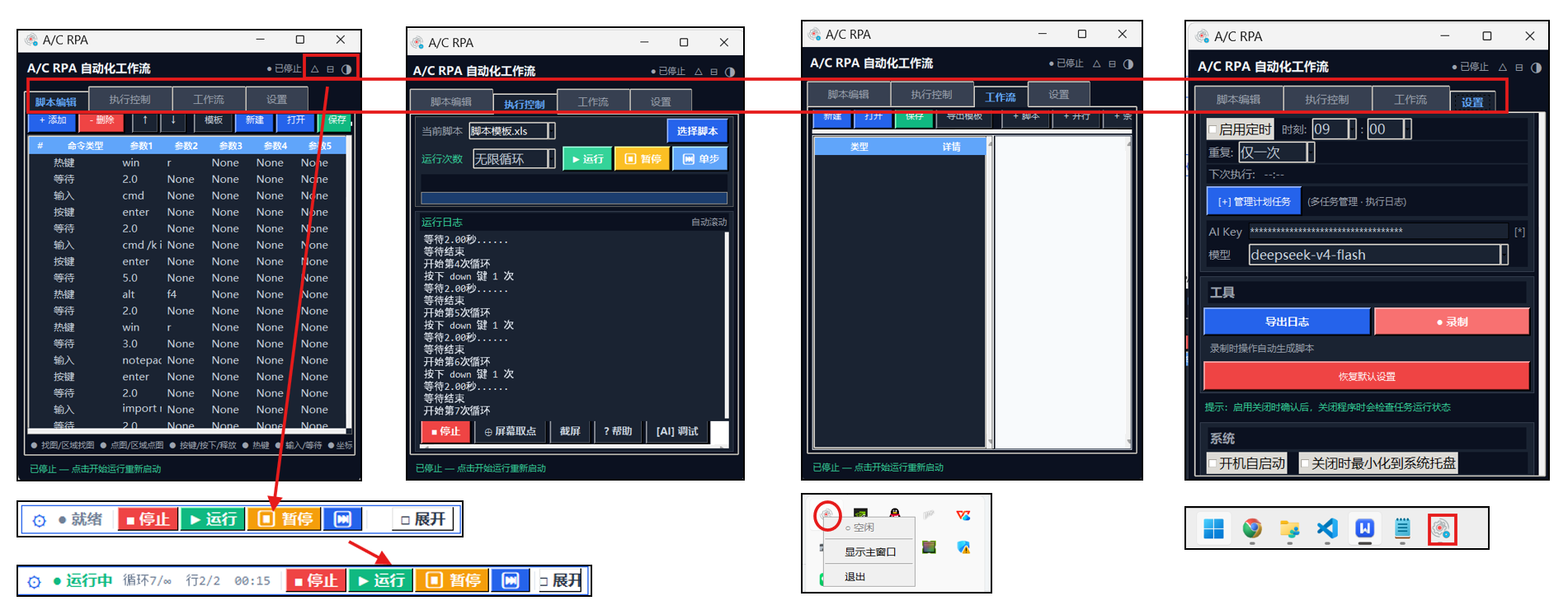
Real ACRPA screens. Click any image to enlarge.

Commands in column A, parameters in columns B–J — orchestrate automation without programming. Inline editing, copy-paste and breakpoint markers: the spreadsheet is the script, and there is no learning curve.

Run / pause / stop / single-step control, breakpoints and conditional breakpoints, variable watcher, call stack and execution time statistics — the run state is clear at a glance.

Visual flow diagram (nodes / connectors / drag-and-drop) with four step types — script, parallel, condition and wait — and live highlighting of the executing node.

Basic execution / AI enhancement / scheduling / logs / advanced settings are managed on separate cards and saved independently; the model dropdown auto-matches the correct API endpoint.

Dark theme plus a collapsible Mini Bar status strip, resident in the system tray — more comfortable and easier on the eyes during long overnight automation runs.
From basic automation to intelligent workflows, ACRPA covers the entire desktop automation stack.
Uses .xls spreadsheets as script files — commands in column A, parameters in columns B–J. Orchestrate automation without programming; the learning cost is minimal.
Image recognition built on OpenCV / Pillow: full-screen and region-limited search, grayscale accelerated matching — locate and click any UI element precisely.
Operate Windows directly: activate, close, minimize, wait for a window to appear or disappear. Window-relative coordinates make it 10–100× faster than image matching.
Record mouse and keyboard actions (including drag, scroll and window activation), with wait intervals inserted automatically. Replay in one click — repetitive work is never manual again.
Daily / weekly / interval / one-shot scheduling modes, executed silently in the background alongside the system tray and Mini Bar.
Optional kernel-level high-performance input backend that simulates real keyboard and mouse input and is hard to detect. Supports direct / simulate / auto write modes with automatic fallback.
Chain multiple scripts with a visual flow diagram (nodes / connectors / drag-and-drop) supporting four step types: script, parallel, condition and wait.
Set variables, read the clipboard, substring / replace, math operations — ${var} syntax works throughout, so complex data is easy to handle.
Recognize text in a screen region, wait for text to appear, click on text. Compatible with PaddleOCR / Windows OCR / Tesseract — even dynamic interfaces can be automated.
Breakpoints / conditional breakpoints, single-step, variable watcher, call stack, execution timing, run-to-cursor and skip-line — problems become obvious.
Switch between light and dark themes in one click. With the system tray and the Mini Bar floating status strip, automation runs quietly in the background.
Structured levelled logs with daily rotation, automatic cleanup and one-click export; built-in script marketplace (works offline) that keeps expanding the script ecosystem.
Self-checks for new versions at startup and fetches the manifest with multi-source fallback (GitHub Releases → raw manifest → CDN mirror). Downloads show progress and are verified by sha256; if a mirror serves an old package it switches source automatically, then a one-click restart completes the replacement without touching your config or scripts.
Built-in Playwright web automation: open a page, click, type, wait for elements, full-page or element screenshots — desktop and web steps can be chained in the same script.
Runaway protection (flick the mouse to abort immediately), maximum execution time limits, stop-on-error and failure retry policies — unattended runs still end safely.
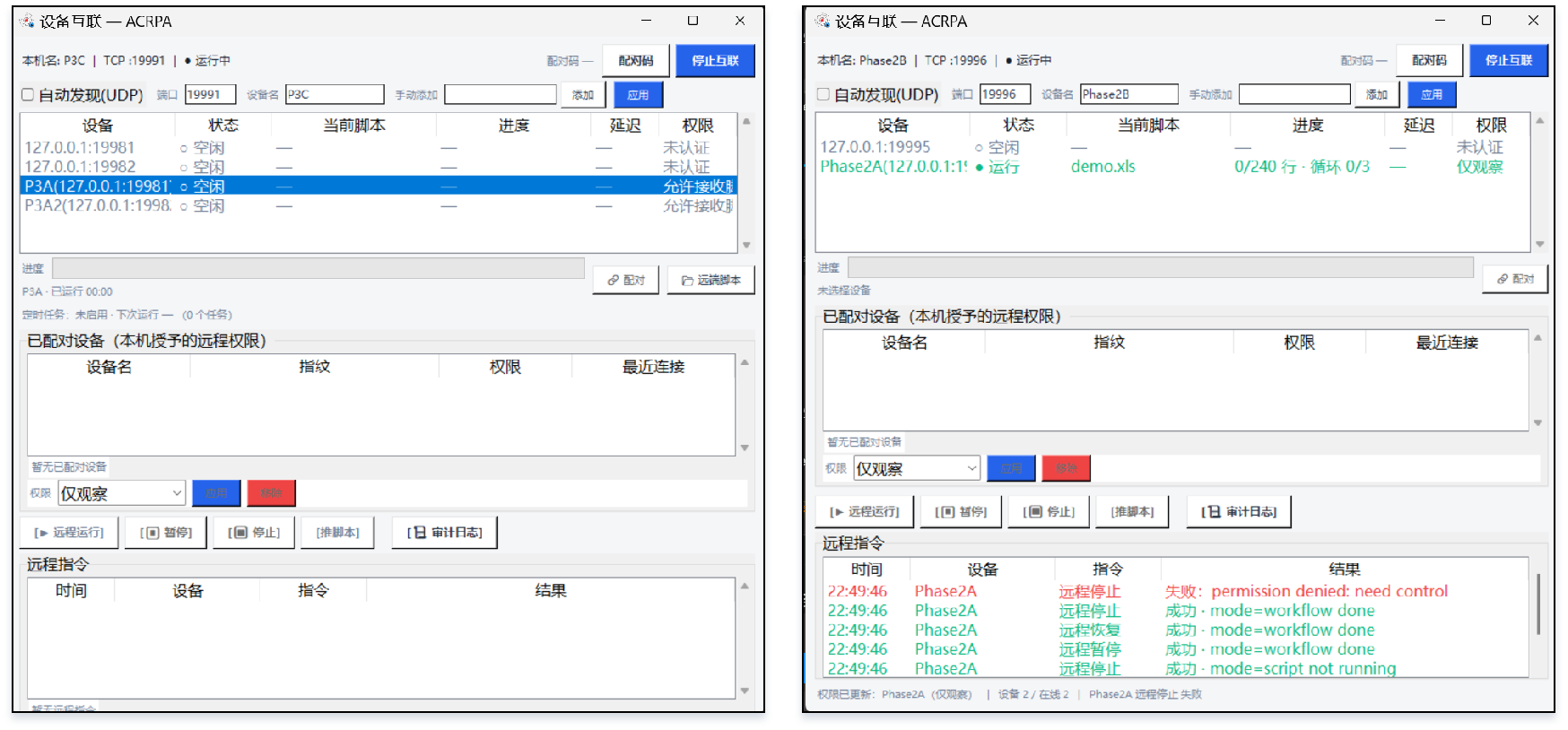
See the progress of every machine on the LAN at a glance, run / pause / stop remotely, distribute scripts in bulk, and view it all from a phone browser — built entirely on the Python standard library with zero extra dependencies, a multi-machine control plane rarely found in tools this lightweight.
Device list plus run state, current script, progress (line number / loop count / elapsed time), live log stream and scheduled task status — select a device and see it immediately, no manual subscription needed.
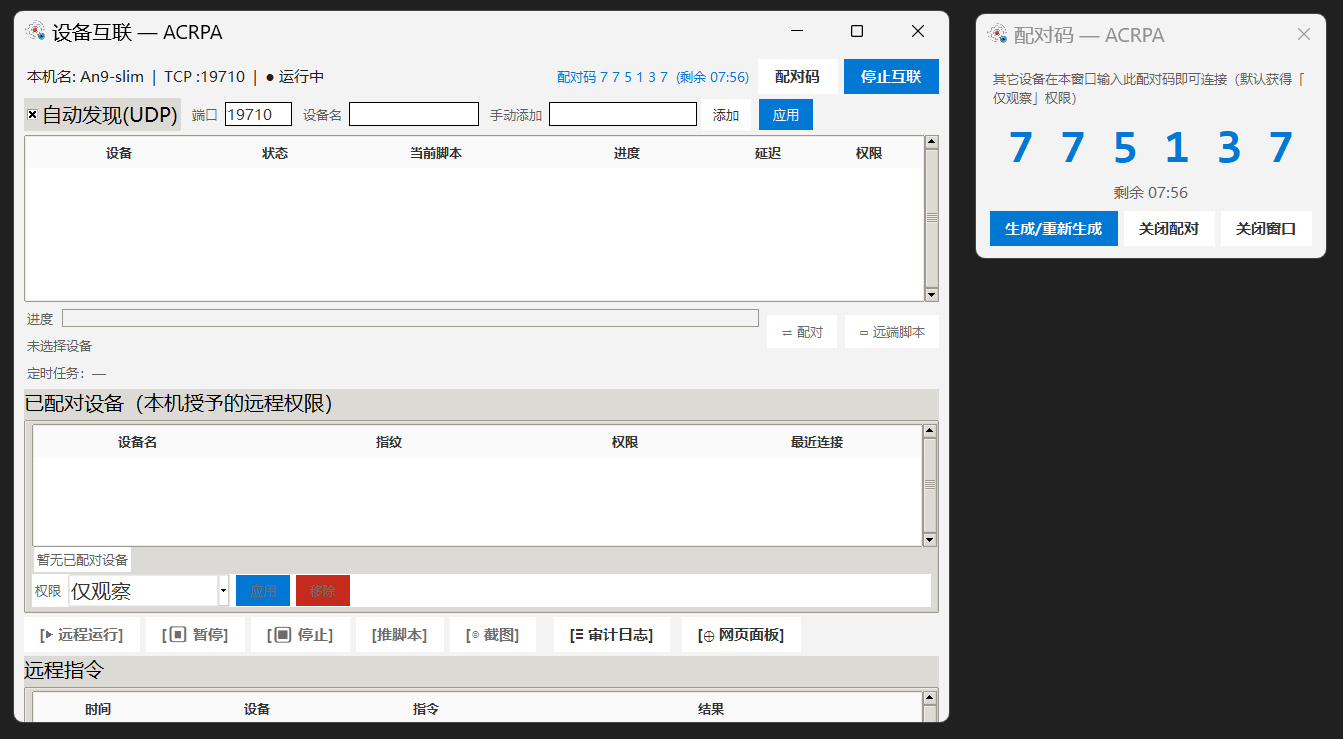
Enter a 6-digit pairing code (valid for 600s by default) to pair. The PIN never travels over the network: a PBKDF2-HMAC-SHA256 derived key plus nonce/HMAC challenge-response is used, and 5 consecutive failures lock the connection. Keys are stored in the Windows credential store, so reconnects after pairing need no PIN.
Run / pause / resume / stop. The controlled machine prompts for confirmation on first control (this device can be remembered). Commands are serialized and acknowledged to all controllers; every remote command and screenshot request is written to the audit log.
Push local .xls / .xlsx / .json files to controlled machines: 64 KB chunking with dual sha256 and size verification on the final frame, leaving no leftover files on failure. Supports bulk delivery to multiple devices and "run right after push".
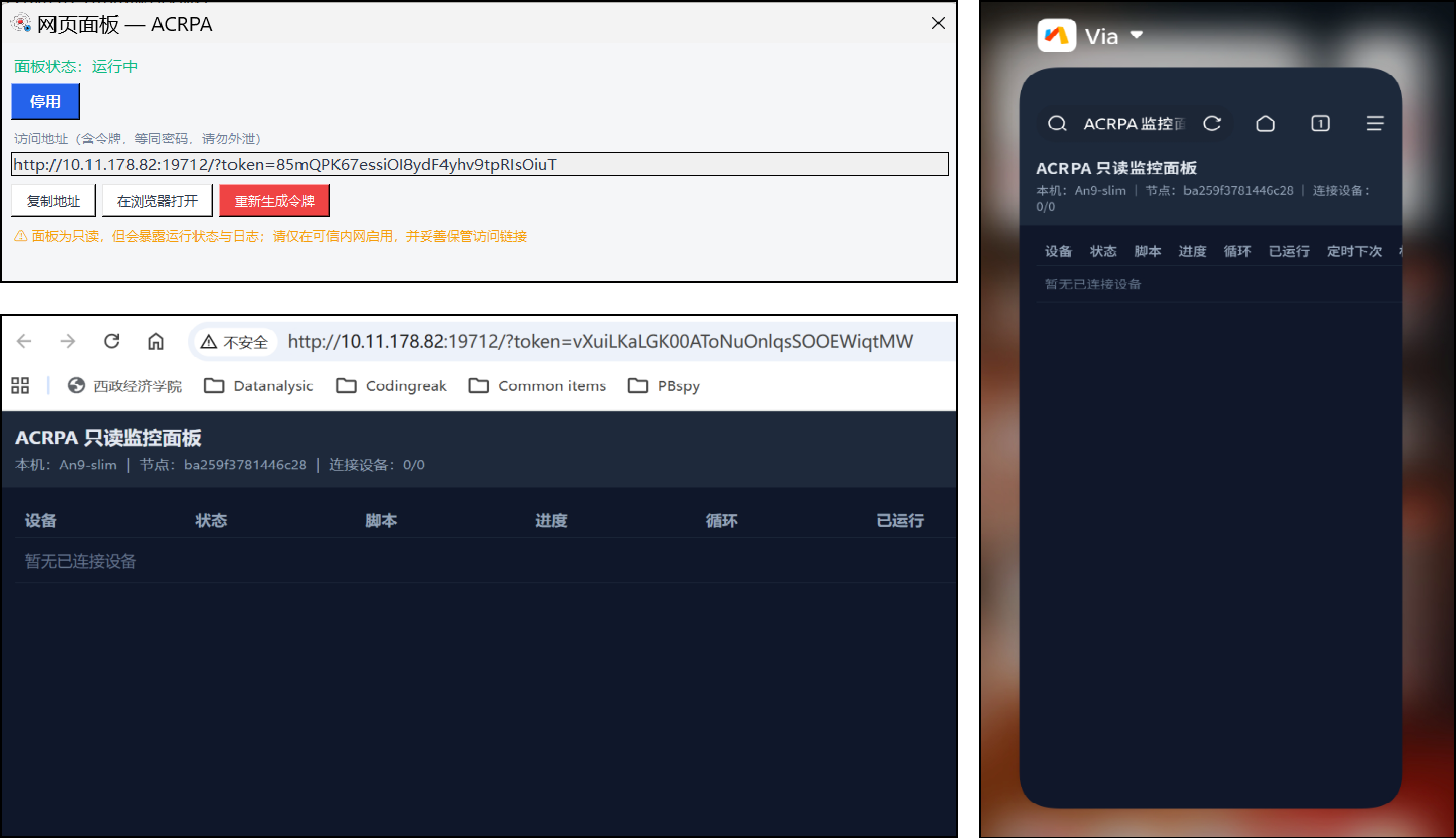
A built-in single-page panel served by http.server (default port 19712, off by default). Check multi-machine progress and logs straight from a phone or tablet browser; token auth (query string / cookie / bearer) with zero write operations.
Encrypted channel with a self-signed certificate based on the stdlib ssl module; the peer certificate sha256 fingerprint is pinned (TOFU) and mismatches are rejected outright. Off by default, enable as needed.
Device list, run state, current script, line number / loop count / elapsed time and the live log stream all in one window — see the whole picture without switching machines.
The controlled machine generates a 6-digit pairing code and the controller enters it to pair. Keys are never written to config.json, reconnects need no PIN after pairing, and first-time control still requires confirmation on the controlled side.
A built-in read-only web panel (default port 19712, off by default). Scan a QR code or type the address on a phone or tablet to view multi-machine progress and logs — the panel contains no write operations at all.
51 built-in commands: write one per row in Excel and use them right away. Click any command or example to copy it. See the README → for full documentation.
| Command | Description | Example |
|---|---|---|
找图 | Search the whole screen for an image; on match, move the mouse to that position (hover) | 找图, hello, 0.9 |
点图 | Find an image and click it, with precision control | 点图, submit, 0.9 |
区域找图 / 区域点图 | Limit the scan region for faster matching, with grayscale acceleration | 区域找图, icon, 0.8, 100,100,500,500 |
坐标 | Click at the given screen coordinates; button, click count and interval are configurable | 坐标, 500, 300, left, 1, 0.1 |
悬停 | Move the mouse to the given coordinates | 悬停, 500, 300 |
按键 / 热键 | Simulate key presses and combinations (Ctrl+C / Ctrl+V and so on) | 热键, ctrl, c |
输入 / 写入 | Paste-style input (unaffected by the IME) or character-by-character simulated typing (DD driver supported) | 写入, Hello, 0.05, auto |
等待 | Delay / wait, supports random ranges (for example 1.0-3.0) | 等待, 1.0-3.0 |
滚轮 / 拖拽 / 相移 | Scroll, drag to given coordinates, or move relative to the current mouse position | 滚轮, -3 |
按下 / 释放 | Hold and release a key to implement press-and-drag and other complex actions | 按下, a |
复制 / 粘贴 | Built-in shortcut combinations (Ctrl+A+C / Ctrl+A+V) | 复制 |
代码 | Execute Python code from a specified txt file (the program built-in libraries can be called) | 代码, my_code |
截屏 | Take and save a screenshot; a timestamp is appended to the filename automatically | 截屏, shot, E:/ACRPA/screenshots |
| Command | Description | Example |
|---|---|---|
激活窗口 | Activate the window with the given title; fuzzy matching supported | 激活窗口, Notepad |
关闭窗口 | Close the specified window | 关闭窗口, Untitled - Notepad |
最小化 / 最大化窗口 | Minimize the window to the taskbar / maximize it | 最小化窗口, Calculator |
获取窗口位置 | Get the window coordinates and size and save them to variables | 获取窗口位置, Notepad, x, y, w, h |
等待窗口 | Wait for a window to appear or disappear, with a configurable timeout | 等待窗口, Chrome, 10, exists |
窗口坐标 | Click relative to the window top-left corner; stays accurate even after the window moves ★ | 窗口坐标, Notepad, 100, 50 |
| Command | Description | Example |
|---|---|---|
设置变量 | Set a variable value; numbers are converted automatically and ${var} references work throughout | 设置变量, count, 100 |
读取剪贴板 | Read clipboard content into a variable | 读取剪贴板, clip_text |
字符串处理 | Substring / replace operations on strings | 字符串处理, text, substring, 0:5, result |
数学运算 | Perform math calculations; ${var} references are supported | 数学运算, ${x}*${y}+1, sum |
如果 / 否则 / 结束如果 | Conditional branch control flow | 如果, ${count}>10 |
循环开始 / 循环结束 | Loop block, by iteration count or condition expression | 循环开始, 5 |
跳出循环 | Break out of the current loop immediately | 跳出循环 |
| Command | Description | Example |
|---|---|---|
识别文字 | OCR the text in a given screen region and store it in a variable | 识别文字, 0, 0, 800, 300, ocr_text |
等待文字 | Wait for specified text to appear / disappear, with a configurable search region | 等待文字, Submit succeeded, 10, exists |
点击文字 | Find the text position and click it; confidence and search region are configurable | 点击文字, Login now, 0.8 |
| Command | Description | Example |
|---|---|---|
AI找图 | Describe a UI element in natural language; AI analyzes the screenshot and locates it (click / hover / find only) | AI找图, the login button, 0.8, click |
AI识别界面 | AI analyzes all UI elements on the current screen; results are stored in a ${prefix}_elements variable | AI识别界面, ui |
AI优化建议 | AI analyzes historical execution data and gives script optimization suggestions | AI优化建议, log |
[AI] 调试 | Ask AI in natural language; AI analyzes the logs and answers debugging questions | click the [AI] Debug button |
| Command | Description | Example |
|---|---|---|
运行工作流 | Invoke a workflow file (.json / .yaml) to run multi-script orchestration | 运行工作流, workflow.json |
工作流变量 | Set workflow-level shared variables for use by multiple sub-steps | 工作流变量, var_name, value |
| Command | Description | Example |
|---|---|---|
打开网页 | Open a URL in the built-in browser; suitable for post-login data retrieval, web form filling and similar flows | 打开网页, https://example.com |
浏览器点击 | Click a web element by CSS selector or visible text | 浏览器点击, #login-btn |
浏览器输入 | Fill text into the specified input box (located by selector) | 浏览器输入, #username, admin |
等待元素 | Wait for a web element to appear / disappear, with a configurable timeout | 等待元素, .result, 10, 出现 |
浏览器截图 | Save a full-page or specific-element screenshot | 浏览器截图, result, page |
Browser commands are implemented on Playwright, installed on demand (about 155 MB, not bundled with the main program); if it is missing, the command shows how to install it. Desktop and web steps can be chained serially in the same script.
Visual workflow diagram · nodes arranged by drag and drop
Chain several scripts into one pipeline and schedule it visually with a flow diagram.
Script (sequential), parallel (run several sub-steps at once), condition (if/else branch) and wait (delay).
Flow control / mouse / keyboard / recognition / window / file / variable / browser, with search filtering and recent items; double-click to add a node quickly.
Four node types — command / variable / loop / log — share one edit form and support enable-disable, comments, cloning, copy-paste and reordering.
The running node is highlighted live with result tracking; failed nodes are marked red, making debugging direct and efficient.
Add an API key to unlock four AI capabilities, with a unified model registry covering DeepSeek / Qwen / GPT / Claude.
Describe a UI element in natural language (for example "the login button"); AI analyzes the screenshot, locates it intelligently and clicks or hovers.
After a failure AI analyzes the cause and adaptively adjusts parameters before retrying — smarter than a fixed retry count.
AI continuously watches for abnormal screens and states during a run and warns early, preventing incorrect operations from spreading.
Ask AI directly about logs and execution issues; it analyzes them and returns conclusions plus optimization advice — debugging with no barrier to entry.
Ten ready-to-use templates cover office, system and interaction scenarios — import one and run it. Combined with conditions, loops and AI generation, they can be quickly adapted into complex flows.
Lightweight, fast cold start, small footprint. Available as an install-free exe or run from source.
Packaged as a single-file exe — double-click and go. If OpenCV is unavailable it falls back to Pillow matching automatically, so it stays stable instead of crashing.
dark_mode Light / dark theme switchretry_max / retry_interval Failure retry count and intervalimage_timeout Image match timeout in secondsapi_key / api_model AI key and model selectionuse_dd_driver DD driver high-performance inputminimize_to_tray / mini_bar_enabled Tray residency and collapsible status barsched_enabled / sched_tasks Scheduled task executionlog_level / log_retention_days Log level and retention daysstop_on_error / failsafe Stop-on-error and runaway protectioncheck_update / app_protect Startup update self-check and process guardContinuous iteration, recently focused on the update mechanism, workflow orchestration, AI enhancement and stability. See GitHub Releases → for the full history.
Rebuilt on the v0.1.25 baseline to fix the unstable wiring introduced in v0.1.26: an undefined _update_pending made _periodic throw a NameError every 100 ms, which broke the status-bar and execution-progress refresh path and prevented the update flag from being set; and an unimported show_update_dialog made the status-bar update entry point dead on click. All v0.1.26 improvements are retained: the reworked update mechanism (multi-source fallback / semantic version comparison / sha256 verification / one-click restart self-update for the portable build / fixed version source for the packaged build), engine-level command failure semantics with workflow error propagation, and the release toolchain with build assets under management.
Update mechanism reworked: fixed the distorted version number after packaging (the EXE always reported an old version, breaking update checks and the About page entirely). Update checks now use multi-source fallback (GitHub Releases → raw manifest → CDN mirror) and return as soon as one source works; if a source reports a version that is not new enough, the remaining sources are probed and the highest is taken, so a stale mirror cache or a network glitch no longer yields a false "already up to date". Version comparison handles the v prefix, uneven segment counts and pre-release suffixes. Network transport is dual-stack (requests → system certificate store), fixing silent failures behind corporate TLS interception. Downloads retry multiple candidate direct links one by one, stream progress, verify sha256 and size, and re-check the VERSION inside the package, switching source automatically when a mirror serves an old package. A new in-app update window and one-click restart self-update for the portable build replace only the main program and VERSION — config, scripts, templates and logs are never touched. Also fixed "command failure silently reported as success" together with the broken stop_on_error and retry behaviour.
Deep customization of the Workflow tab: categorized action tree with search and recent items; new command / variable / loop / log nodes sharing one configuration form, with right-click copy / paste / disable / comment; control over outer loop count and maximum execution time; execution highlighting and variable management; centrally managed version numbers.
New Advanced Settings page (maximum execution time / globally bound window / recording mode / OCR backend / headless browser and more); every settings card gets its own "Apply ✓"; the model dropdown now uses a unified registry (DeepSeek / Qwen / GPT / Claude); fixed the DD DLL path not taking effect and the wrong Claude endpoint mapping.
Template picker dialog switched to a top-bottom layout; exception protection when toggling the tray; a "restore defaults" button; fixed issues such as the script not loading after recording and the card_log variable name collision.
Structured logging upgrade (log levels / timestamps / daily rotation / automatic cleanup); settings page rebuilt as six independent cards; a record button added to the script editing toolbar.
System tray icon with balloon notifications and a context menu; Mini Bar collapsed mode (a floating always-on-top status strip) that is draggable, follows the theme and updates its status live.
Visual workflow diagram (nodes + connectors + drag and drop); window-relative coordinate system; recording enhancements (drag / scroll / window activation); improved conditional breakpoint UI and LRU eviction for the image cache.
AI enhancement module released: visual localization (AI find image / AI inspect UI), smart retry, anomaly detection, flow optimization suggestions and natural-language debugging.
OCR text recognition commands, a script marketplace panel, debugger enhancements (execution timing / skip line / run to cursor / in-place variable editing) and package size optimization.
Integrated the DD driver high-performance input backend; unified shutdown cleanup; AI generator and template improvements; more complete documentation for image/color recognition and OCR.
The hardest question for a desktop automation tool is "should I dare install it?". ACRPA answers with: open source, local, install-free.
A few things you may want to know before downloading.
Questions, ideas, or want to contribute? Get in touch with the author.

yoho12138@aliyun.com682075338